Mastering the Luxurious Black and Gold Text Effect for High-End Design
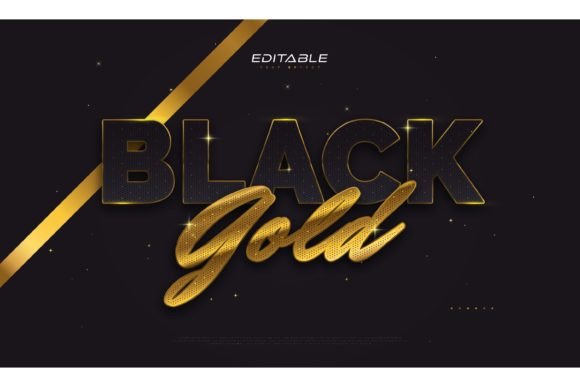
In the competitive landscape of graphic design, first impressions are often dictated by color psychology and typographic elegance. Few combinations evoke a sense of prestige, wealth, and sophistication quite like black and gold. The Luxurious Black and Gold Text Effect is more than just a stylistic choice; it is a strategic design asset used to elevate brand identity, create eye-catching marketing materials, and convey premium quality instantly. For designers, marketers, and business owners, understanding how to implement this aesthetic efficiently can significantly reduce production time while maintaining high visual standards.
This article explores the practical applications of this specific text style, addressing common challenges in creating metallic effects manually and demonstrating how pre-made, editable assets can streamline your workflow. Whether you are designing a luxury real estate brochure, a high-end product label, or an exclusive event invitation, mastering this effect is essential for achieving a polished, professional look.
The Challenge of Creating Metallic Text Manually
Creating a realistic gold effect in vector software like Adobe Illustrator is notoriously difficult for many designers. It requires a nuanced understanding of gradients, blending modes, and lighting effects. A flat yellow or orange color rarely convinces the eye that the text is metallic. To achieve authenticity, one must simulate the way light reflects off a curved, shiny surface. This involves complex layering of highlights, mid-tones, and shadows.
Furthermore, balancing this metallic sheen against a deep, rich black background adds another layer of complexity. If the contrast is too low, the text becomes illegible. If the gold is too bright or saturated, it can appear cheap or tacky rather than luxurious. Many designers spend hours tweaking gradient stops and opacity masks, only to find the result lacks the cohesive polish seen in high-end commercial work. This time-consuming process can bottleneck projects, especially when multiple variations or quick turnarounds are required.
How Pre-Made Text Effects Solve Design Bottlenecks
This is where resources like the Luxurious Black and Gold Text Effect package become invaluable. Rather than building the effect from scratch, designers can utilize pre-configured styles that have already been optimized for visual impact. These assets are not fonts themselves but rather applied effects that can be transferred to any typeface. This distinction is crucial because it offers unlimited flexibility. You are not locked into a specific font family; instead, you can apply the luxurious gold styling to serif, sans-serif, script, or display fonts depending on your project’s needs.
The primary benefit here is efficiency. With files included in EPS format and JPG previews, users can integrate these effects directly into their existing workflows. The "click and change" functionality means that you can swap out placeholder text with your own copy, and the effect automatically adjusts. This eliminates the need to manually recreate gradients for every new headline or logo variation. For agencies handling multiple clients in the luxury sector, this scalability is a game-changer.
Practical Applications Across Industries
The versatility of the black and gold aesthetic allows it to be applied across a wide range of industries. Understanding where and how to use this effect can maximize its impact.
- Luxury Real Estate and Hospitality: High-end property listings and hotel branding often rely on dark, moody backgrounds with gold accents to suggest exclusivity. Using this text effect on brochures or digital ads can immediately signal premium pricing and quality.
- Fashion and Beauty: Cosmetic brands and fashion labels frequently use metallic typography on packaging and social media graphics. The contrast of gold against black creates a dramatic, glamorous feel that appeals to consumers seeking indulgence.
- Corporate Events and Galas: Invitations for award ceremonies, galas, or executive conferences benefit from the formal elegance of this style. It conveys seriousness and celebration simultaneously.
- Premium Product Packaging: For products like spirits, chocolates, or electronics, gold text on black packaging stands out on shelves and communicates a higher value proposition.
Customization and Flexibility for Different Users
One of the most significant advantages of this resource is its adaptability. Different users will approach the Luxurious Black and Gold Text Effect with varying goals, and the editable nature of the files accommodates these diverse needs.
For the Novice Designer: If you are new to Adobe Illustrator, the learning curve for creating metallic gradients can be steep. This asset allows you to produce professional-grade results without deep technical knowledge. You simply input your text, choose a font you like, and the effect is applied. It serves as an excellent educational tool, allowing you to deconstruct the layers and understand how the effect was built.
For the Professional Graphic Designer: Even experienced designers benefit from time-saving assets. When working under tight deadlines, having a library of high-quality text effects allows you to focus on layout, composition, and strategy rather than getting bogged down in technical execution. You can quickly generate multiple concepts for client approval, iterating on font choices and sizing without rebuilding the style each time.
For Marketing Managers and Business Owners: Those who may not use design software daily can still leverage these files if they have basic editing skills or access to a freelance designer. Providing a clear, high-quality asset ensures that brand consistency is maintained across all materials. It reduces the back-and-forth communication about "making the gold look richer," as the baseline quality is already established.
Technical Considerations and Best Practices
To get the most out of your Luxurious Black and Gold Text Effect, consider the following technical recommendations:
- Font Selection Matters: While the effect is editable, the choice of typeface significantly influences the final outcome. Serif fonts with high contrast between thick and thin strokes often showcase gold gradients beautifully. Script fonts can look elegant but may lose legibility if the gold highlights are too aggressive. Bold sans-serifs work well for modern, minimalist luxury.
- Scalability with EPS: Ensure you are working with the EPS files provided. As vector formats, they allow you to scale the text to any size—from a small business card to a large billboard—without losing resolution or sharpness. This is critical for maintaining the crisp edges of the gold effect.
- Color Profile Awareness: When preparing files for print, ensure your document is set to CMYK color mode. Gold is particularly tricky in print because standard printers cannot reproduce metallic ink. The gradient effect simulates the look of gold, but for true metallic shine, you may need to discuss spot UV or foil stamping options with your printer. For digital use, RGB mode will ensure the colors remain vibrant on screens.
- Contrast and Legibility: Always test your text against various backgrounds. While black is the default companion for this gold effect, ensure there is sufficient contrast if you place the text over images or patterns. Sometimes, adding a subtle drop shadow or outer glow can help separate the text from busy backgrounds.
Conclusion: Elevating Your Design Standard
The Luxurious Black and Gold Text Effect represents a fusion of aesthetic appeal and practical utility. In a market where consumers are increasingly drawn to premium experiences, the visual language of your brand plays a pivotal role in shaping perception. By utilizing high-quality, editable text effects, you bypass the technical hurdles of manual gradient creation and focus on delivering compelling messages.
Whether you are refining a brand identity or launching a new product, this tool offers a reliable pathway to achieving a sophisticated, high-end look. With the ability to edit words, fonts, and sizes effortlessly, and with files ready for immediate use in Adobe Illustrator, the barrier to entry for luxury design is lower than ever. Embrace these resources to save time, enhance consistency, and ultimately, create designs that resonate with your audience’s desire for quality and elegance.