Streamlining Luxury Branding with the Shiny Rose Gold Text Effect for Illustrator
In the competitive landscape of digital design and brand identity, visual consistency is not merely an aesthetic preference; it is a functional necessity. For professionals working in fashion, beauty, lifestyle, or luxury goods, the demand for high-end metallic finishes is constant. Achieving a convincing Text Effect Shiny Rose Gold Style manually in vector software can be a time-consuming process involving complex gradient meshes, multiple blending modes, and meticulous layer management. This is where pre-configured graphic style assets become invaluable tools for modern creatives.
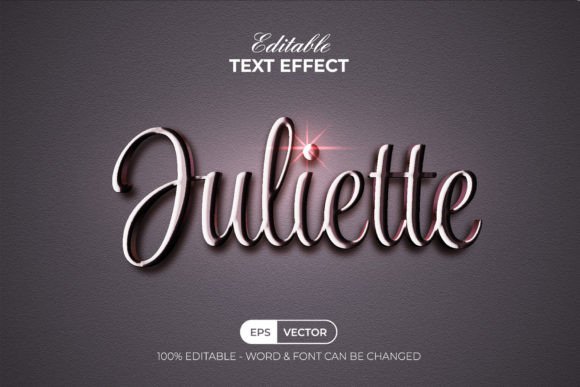
The Text Effect Shiny Rose Gold Style available for Adobe Illustrator represents a shift toward workflow efficiency. Rather than treating this asset as a simple font replacement, it is essential to understand its function as a dynamic styling engine. It allows designers to apply sophisticated metallic textures to any typography or shape with a single click, maintaining full editability and scalability. This article evaluates the practical utility, technical specifications, and real-world application of this design resource for professionals seeking to elevate their visual output without sacrificing production speed.
Understanding the Mechanics: Graphic Styles vs. Fonts
A common misconception among junior designers is conflating text effects with fonts. It is crucial to clarify that this product is not a font. Instead, it is a collection of Adobe Illustrator Graphic Styles. This distinction is vital for understanding its flexibility. A font dictates the shape of the characters, whereas a graphic style dictates the surface appearance—color, texture, lighting, and depth.
By utilizing the Graphic Styles panel in Adobe Illustrator (CC or above), users can apply the rose gold effect to any existing typeface. This means you are not locked into a specific typographic choice. Whether your brand guidelines require a sleek sans-serif, a classic serif, or a handwritten script, the Text Effect Shiny Rose Gold Style adapts to the underlying geometry of the letters. This separation of form and finish provides a level of creative freedom that static image overlays or font-specific effects simply cannot match.
Key Features and Technical Specifications
When evaluating a digital asset for professional use, reliability and organization are paramount. The structure of this particular rose gold effect set demonstrates a clear understanding of user needs. Here are the core technical attributes that define its usability:
- Editable Vector Foundation: The effect is built on 100% editable vectors. This ensures that whether you are designing a business card or a large-format billboard, the resolution remains crisp and clean.
- RGB Color Profile: Optimized for digital displays, websites, and social media content, the RGB color space ensures that the metallic shine translates accurately on screens.
- Layer Organization: The files feature well-organized layers, allowing users to dissect the effect if necessary. This transparency is helpful for troubleshooting or customizing the intensity of the shine.
- Free Font Compatibility: The preview files utilize free fonts, and download links are provided in the included "Read Me" text file. This removes licensing barriers during the testing phase.
- Comprehensive File Package: The download includes one EPS file, one AI file, a JPEG preview for quick reference, and a text file with instructions and font links.
Workflow Efficiency and Ease of Use
The primary value proposition of this asset is speed. In a traditional workflow, creating a realistic rose gold texture involves creating gradients, adding noise for texture, applying inner glows, and adjusting opacity masks. This process can take thirty minutes to an hour per text element. With the Text Effect Shiny Rose Gold Style, the process is reduced to seconds.
The implementation is straightforward. After installing the graphic styles into your Illustrator library, you simply type your text or draw your shape. With the object selected, you click the desired style from the Graphic Styles menu. The effect applies instantly. If you need to change the wording, you simply retype the text using the Type Tool, and the effect updates automatically. This non-destructive editing capability is essential for iterative design processes where client feedback often requires multiple textual revisions.
Furthermore, the effect is not limited to text. Any vector shape can receive the same treatment. This allows for cohesive branding across logos, icons, and decorative elements. For example, a monogram logo and the accompanying brand name can share the exact same metallic finish, ensuring visual harmony across all brand touchpoints.
Real-World Applications and Industry Fit
Who benefits most from integrating this tool into their design stack? The applicability spans several industries where perception of luxury and quality is critical.
Beauty and Cosmetics Brands
Rose gold has become synonymous with the beauty industry, particularly in packaging for skincare, makeup, and haircare products. Marketers and package designers can use this effect to create realistic mockups for social media campaigns or e-commerce listings without needing to photograph physical prototypes. The ability to quickly iterate on product names or promotional slogans allows for faster A/B testing of visual assets.
Wedding and Event Stationery
For freelancers and small business owners specializing in wedding invitations or event programs, time is money. The Text Effect Shiny Rose Gold Style enables rapid production of high-end looking digital invites or save-the-date cards. The elegance of the metallic finish adds perceived value to the design, allowing creators to charge premium rates for digital-only deliverables.
Social Media Content Creators
Influencers and digital marketers often need to produce eye-catching quotes or announcements for Instagram and Pinterest. Metallic text stands out in crowded feeds. By using this Illustrator effect, creators can generate consistent, branded templates that maintain a luxurious aesthetic across all posts, reinforcing their personal brand identity.
Evaluating Quality and Limitations
While the convenience of pre-made styles is undeniable, it is important to approach them with a critical eye regarding quality and limitations.
Color Accuracy: The effect is designed in RGB. This is ideal for web and screen use. However, if you intend to print physical materials, such as foil-stamped business cards or brochures, screen-based metallic effects will not translate directly to print. Printers require specific spot colors or actual foil stamping processes. Therefore, this tool is best suited for digital marketing assets, web design, and digital mockups rather than final print production files.
Customization Depth: While the styles are editable, they are presets. Designers with highly specific vision requirements may find themselves wanting to tweak the gradient angles or highlight positions. The well-organized layers facilitate this, but it does require a intermediate knowledge of Illustrator’s Appearance panel. For beginners, the preset may be perfect as-is; for advanced users, it serves as a strong starting point for further customization.
Font Dependency: Since the effect relies on the underlying font shape, the final result is heavily dependent on the typeface chosen. Thin, delicate fonts may not show off the metallic gradient as effectively as bold, heavy weights. Users should experiment with different font weights to achieve the desired visual impact. The inclusion of free font links helps mitigate this trial-and-error process.
Long-Term Value for Creative Professionals
Investing in tools like the Text Effect Shiny Rose Gold Style is less about purchasing a single effect and more about optimizing your long-term workflow. For agencies and freelancers, the hours saved on repetitive styling tasks accumulate significantly over a year. This time can be redirected toward strategy, concept development, or client communication—areas that generate higher value.
Moreover, having a reliable library of high-quality effects ensures consistency. When multiple designers work on a single brand account, using standardized graphic styles prevents visual drift. Everyone applies the same rose gold finish, ensuring that the brand looks cohesive regardless of who created the asset.
In conclusion, this Adobe Illustrator text effect set is a practical, efficient solution for designers needing to incorporate luxury metallic aesthetics into their work. It bridges the gap between high-end visual appeal and production efficiency. By understanding its technical constraints—specifically its RGB nature and dependency on font choice—professionals can leverage this tool to enhance their creative output, streamline their workflow, and deliver polished, professional results to their clients. For those serious about maintaining a competitive edge in visual design, integrating such specialized assets is a smart, strategic move.